
Production RAG with LangChain & Vector Databases
Personal notes from the freeCodeCamp Production RAG course, covering the full pipeline from document loading and chunking strategies to hybrid search, vector database tuning, production API architecture, Agentic RAG with LangGraph, and advanced topics like GraphRAG, Contextual Retrieval, and Multimodal RAG.
Production RAG with LangChain & Vector Databases
These are my personal notes from the LangChain and LangGraph docs and the Production RAG with LangChain & Vector Databases full course by freeCodeCamp. They cover the course from start to finish: setup, chunking strategies, hybrid search, production architecture, Agentic RAG, and the advanced topics at the end. I might keep expanding this document, or add a new one as I work through the RAG and Agents sections in AI Engineering by Chip Huyen.
Note: The AI landscape moves fast. Check the current official docs for package names, imports, and APIs. The settings and snippets here are learning examples, not a fully tested application or universal production defaults. The same applies to retrieval techniques: start with a baseline, inspect failures, and measure whether a change actually helps your documents and questions.
Project Setup
To set up a RAG project, first decide whether you are using hosted APIs or local models. Hosted providers may require API keys; a local setup with Ollama can run without a paid API key.
curl -LsSf https://astral.sh/uv/install.sh | sh   # install uv
uv init                                       # initialize the project
uv venv                                       # create the virtual environment
source .venv/bin/activate                      # activate it
Add the libraries needed for the examples you want to use:
# Core components
uv add langchain-core langchain-text-splitters langchain-community langgraph pypdf

# Choose the model integrations you need
uv add langchain-openai
uv add langchain-anthropic
uv add langchain-ollama

# For the Chroma examples
uv add langchain-chroma

# For the older chain/retriever examples and BM25
uv add langchain-classic rank-bm25
You don't need every provider package. Install the ones your code imports. Add langchain if you use its current agent APIs.
Some course examples use older imports. In LangChain v1, older chains and retrievers moved to langchain-classic. For example:
from langchain_text_splitters import RecursiveCharacterTextSplitter
from langchain_chroma import Chroma
from langchain_classic.retrievers import EnsembleRetriever
from langchain_community.retrievers import BM25Retriever
For the API and configuration sections later:
uv add fastapi uvicorn pydantic-settings langsmith
uv add --dev pytest
Keep a tested uv.lock in the project so others can reproduce the environment. A package list alone doesn't establish that every course example works with the installed versions.
References: LangChain v1 migration, Chroma integration.
The Complete RAG Pipeline
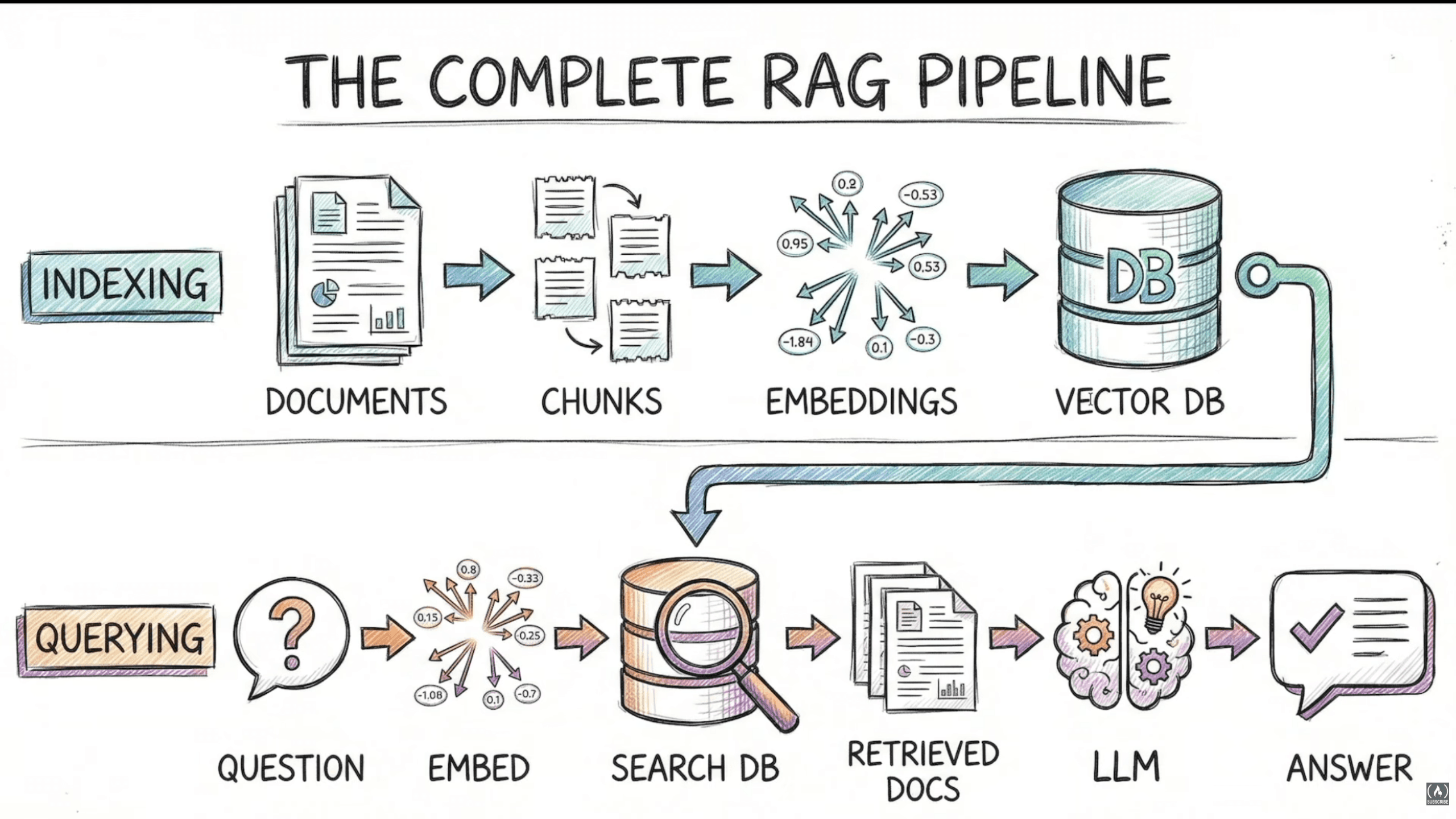
RAG has two main phases: Indexing and Querying.
Indexing prepares the knowledge base, often in a background or offline process. It runs initially and when documents or processing settings change. Querying retrieves evidence and generates a response for a request.
Indexing Pipeline
- Document Loaders: extract content from files and preserve metadata such as source IDs, titles, headings, page numbers, and versions. Check that the extracted text still makes sense.
- Text Splitters: create chunks that preserve useful evidence. Choose the boundaries, size, and overlap based on the documents and evaluation results.
- Embedding Generation: convert chunks into vectors using a local model or a hosted API.
- Vector Storage: store the vectors with their original text and metadata. Choose exact or approximate search based on scale and performance requirements.
Ready for queries! But the index still needs maintenance: new, changed, and deleted documents should be reflected in the searchable data.
Querying Pipeline
- Take the user's question.
- Encode it with the query encoder compatible with the indexed document embeddings.
- Search for relevant vectors, applying the required source and access filters.
- Retrieve the original text and metadata for the results.
- Augment: combine
system instructions + retrieved evidence + user query, within the model's context budget. - Generate an answer with source references, and handle cases where the evidence is insufficient.
Retrieving similar text does not guarantee a correct answer. We need to check both whether the right evidence was retrieved and whether the model used it correctly.
Three rules for production RAG:
- Keep the embedding space compatible: use the intended model configuration, dimensions, query/document encoding, and similarity metric. Some models use different prompts or encoding paths for queries and documents. Equal vector lengths alone do not mean two embedding models are compatible.
- Preserve the evidence: strong embeddings cannot recover information lost during extraction or chunking. Inspect source coverage, document structure, metadata, and duplicates.
- Test retrieval separately: measure whether the needed evidence was returned, then evaluate the generated answer. Track latency and cost alongside quality.
If you change to an incompatible embedding model, re-embed the corpus. For more on query and document encoding, see Sentence Transformers' semantic search guide.
Document Processing: Chunking
Chunking Decision Framework
| Document Type | Starting Approach | What to Check |
|---|---|---|
| General prose | Recursive splitting | Whether boundaries separate important evidence |
| Structured technical docs | Heading/section-aware splitting | Whether procedures, headings, and tables retain their meaning |
| Code | Language-aware splitting where practical | Whether functions and symbols keep the context they need |
| Markdown | Header-based splitting, with size limits | Whether the section path is preserved |
| Prose with weak structure | Compare recursive and semantic splitting | Whether semantic boundaries improve retrieval |
Start with a simple baseline. Add complexity when you can show which failure it fixes.
Be explicit about characters vs tokens. With the default character-based length function, chunk_size=500 means 500 characters, not 500 tokens. There is no single chunk size that fits every document and query type.
How each works:
- Recursive: tries a list of separators in order until the pieces are small enough. LangChain's defaults are paragraph breaks, line breaks, spaces, then individual characters. This tries to preserve natural structure, but it is not a sentence parser.
- Semantic: uses changes in embedding similarity between sentences or sentence groups to propose boundaries. The buffering, thresholds, and size constraints depend on the implementation.
Overlap can help when evidence crosses a boundary. It can also duplicate text and increase indexing work, so tune it instead of treating it as mandatory.
Late Chunking takes a different approach: compute contextual token representations first, then pool them into chunk vectors. This lets a chunk's representation include surrounding context before pooling. More on this in the advanced section.
Reference: LangChain recursive splitter.
Advanced Chunking Strategies
Parent Document Retriever: the idea is to search small chunks, then return their larger parent text. Create a child splitter for precise retrieval units and, optionally, a parent splitter for the larger sections. ParentDocumentRetriever connects a vectorstore, a docstore, a child_splitter, and an optional parent_splitter.
In the usual setup, child embeddings go into the vector store and parent text goes into the document store. This does not automatically mean twice as many vectors. Returning the parent can restore missing context, but it also increases the amount of text sent to the LLM. Keep source metadata and the child-to-parent mapping intact.
Contextual Compression Retriever: applies a compressor to the retrieved documents before they reach the answering model. Depending on the implementation, it can filter, rerank, or extract relevant text.
For an LLM-based extraction example, LLMChainExtractor.from_llm() creates the compressor, and vectorstore.as_retriever() can provide the base retriever. The trade-off is extra processing at query time. Compression may reduce the final prompt size, but it can also remove important qualifications or add latency and cost.
Measure the complete request. Fewer tokens in the final prompt do not necessarily mean a cheaper or faster pipeline.
Code reference: advanced_rag.py includes course examples of ParentDocumentRetriever, ContextualCompressionRetriever, EnsembleRetriever, and MultiQueryRetriever. Check imports and behavior against your installed versions.
Chunking Approaches Comparison
| Approach | Potential Benefit | Trade-off to Evaluate |
|---|---|---|
| Independent chunks | Simple baseline | Surrounding context may be missing |
| Overlapping chunks | Retains some boundary context | Duplicate text and additional indexing work |
| Contextual Retrieval | Adds identifying context before indexing | Generated context can be wrong; indexing work grows |
| Late Chunking | Uses contextual token representations before pooling | Needs suitable token outputs and control over pooling |
| Parent-Child Retriever | Searches small units and returns wider context | Parent storage and larger returned passages |
There is no universal ranking here. Compare the approaches using the same questions and source evidence, with clear resource budgets.
Building a Basic RAG System
Step 1 — Create a vector store from the knowledge base:
- Init
RecursiveCharacterTextSplitter, for example withchunk_size=500andchunk_overlap=50. - Load the documents with their metadata and split them into chunks.
- Create a vector store using the selected embedding configuration. For local Chroma persistence, provide a persist directory.
- Keep the configuration and source versions so you can reproduce the index.
Step 2 — Build the RAG chain:
- Open the vector store and call
.as_retriever(), for example withsearch_type="similarity"andsearch_kwargs={"k": 2}. - Init a chat model from a provider: OpenAI, Anthropic, Ollama, etc.
- Create a prompt with
{context}and{question}as template variables. - Format the retrieved documents, including source labels when you need citations.
- Build the RAG chain using the
|pipeline operator:
from langchain_core.output_parsers import StrOutputParser
from langchain_core.runnables import RunnablePassthrough

# retriever, format_docs, prompt, and llm are configured above
rag_chain = (
    {"context": retriever | format_docs, "question": RunnablePassthrough()}
    | prompt
    | llm
    | StrOutputParser()
)- Invoke with
.invoke(question)to get the answer.
For a minimal text-only demo, format_docs can join the passages:
def format_docs(docs):
    return "\n\n".join(doc.page_content for doc in docs)
For an API that returns evidence, preserve source IDs and page or section references alongside the answer. The simple formatter above leaves that metadata out of the prompt. Add source labels and retain the retrieved records when implementing citations.
chunk_size=500,chunk_overlap=50, andk=2are example settings. Test them on your data. A generated citation also needs checking: pointing to an existing document does not prove that it supports the answer.
Debugging RAG Systems
Five Common RAG Failure Modes
- Evidence lost during ingestion or chunking: inspect the extracted text, headings, tables, and chunk boundaries. Try structural splitting, overlap, or parent context when the failure calls for it.
- Embedding mismatch: check the model, dimensions, query/document encoding, normalization, and similarity metric. Matching dimensions alone are not enough.
- Retrieval noise or missing evidence: irrelevant chunks enter the context, or necessary chunks never make it into the candidate set. Inspect filters, candidate counts, ranking, and duplicates.
- Context assembly problems: evidence gets truncated, ordered poorly, duplicated, or pushed beyond the model's input budget.
- Unsupported generation: the LLM produces claims that the retrieved evidence does not support, or answers when the documents do not contain an answer.
Other failures include stale sources, conflicting document versions, and incorrect access controls. The point is to find the stage that failed before changing the whole pipeline.
Inspecting Similarity Scores
For a small example, we can inspect dense retrieval directly:
- Embed the documents and query using compatible encoders.
- Calculate the similarity between the query and each document vector.
- Sort the results and read the passages, not just the scores.
For nonzero vectors, cosine similarity is:
cosine_similarity(a, b) = dot(a, b) / (norm(a) * norm(b))This is useful for inspecting rankings. A high similarity score is not a probability that the document answers the question, and it does not establish that the embedding configuration is correct.
When Vector Search Is Not Enough
Some query patterns are worth testing carefully:
| Query Pattern | Example | Possible Failure |
|---|---|---|
| Product codes | SKU-7722XX specs | A similar product ranks above the requested one |
| Acronyms | WCAG compliance | Domain meaning is poorly represented |
| Error codes | E_CONN_REFUSED | General error documentation outranks the specific code |
| Names and versions | John Smith accounting | A related entity or different version is returned |
Embedding models can represent names, codes, and abbreviations. These examples are possible failure cases, not rules that dense retrieval always fails on them.
One option: Hybrid Search Pipeline
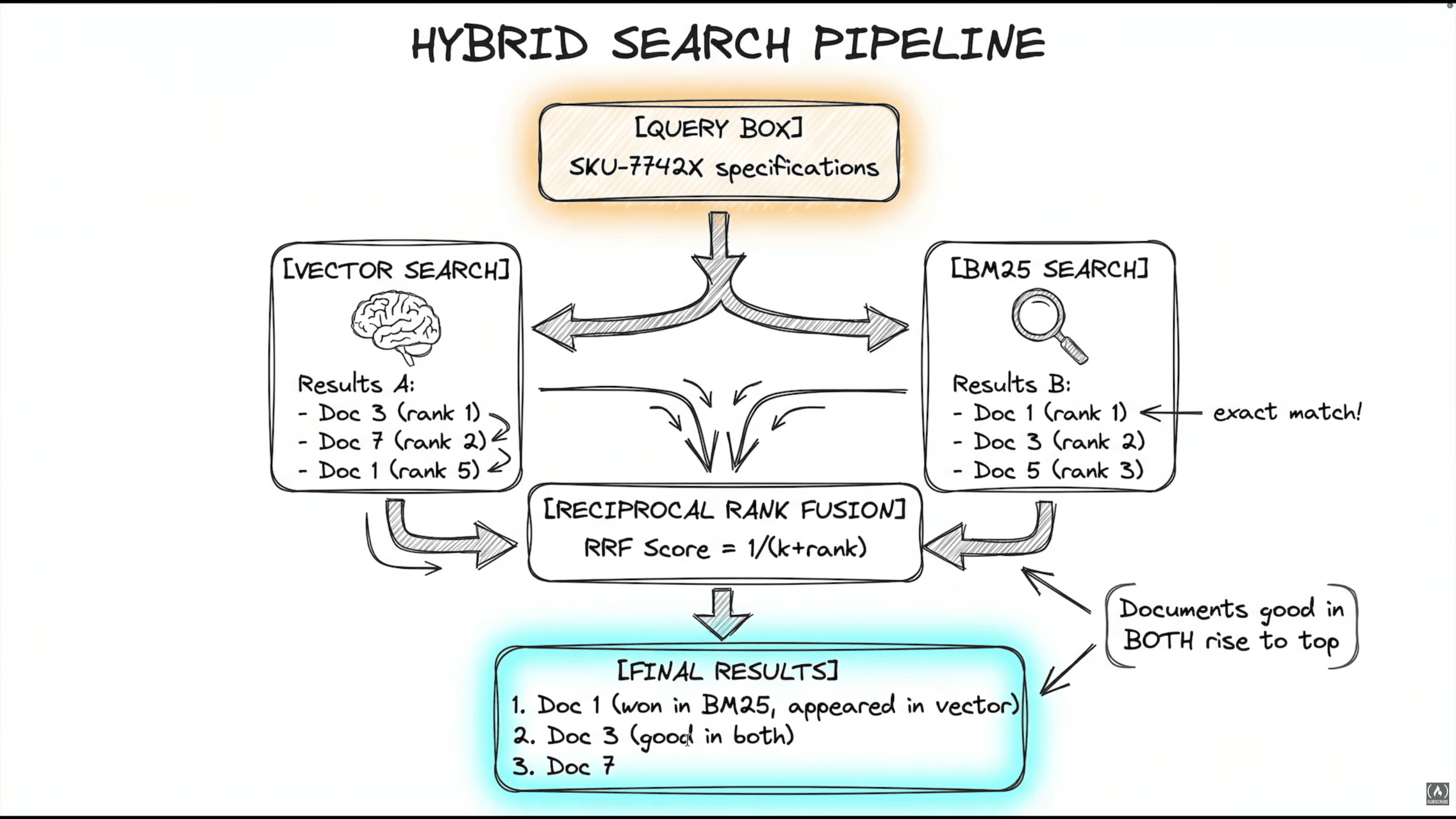
Combine Vector Search for semantic similarity and BM25 Search for lexical relevance:
from langchain_classic.retrievers import EnsembleRetriever
from langchain_community.retrievers import BM25Retriever

# vector_store and docs refer to the same searchable chunk collection
vector_retriever = vector_store.as_retriever(search_kwargs={"k": 3})

bm25_retriever = BM25Retriever.from_documents(docs, k=3)

ensemble_retriever = EnsembleRetriever(
    retrievers=[bm25_retriever, vector_retriever],
    weights=[0.5, 0.5],
)
BM25 uses lexical matching and term statistics. Its behavior depends on tokenization and preprocessing; it is not the same as an exact-string filter.
RRF = Reciprocal Rank Fusion. It combines ranked lists by summing each document's contributions. A weighted version is:
score(d) = sum(weight_i / (c + rank_i(d)))Only lists containing the document contribute. Ranks start at 1, and c is a smoothing constant. It is separate from the k used to control how many results each retriever returns. Unweighted RRF uses equal contributions.
Notes on usage:
- Start with equal weights as a baseline, then evaluate them against lexical-only and vector-only retrieval.
- Keep chunk identifiers consistent and check how the implementation merges duplicate results.
- BM25 is a ranking function. Incremental update support depends on the search implementation. A simple in-memory retriever built from a fixed corpus needs to be rebuilt or refreshed when that corpus changes.
- Tune candidate counts using your evaluation set. There is no universal minimum
kthat makes hybrid retrieval correct. - Measure latency and quality. Hybrid search is a technique to test, not an automatic production upgrade.
References: RRF scoring; the course's advanced_rag.py includes demo_ensemble_hybrid_search() for comparing retrieval results.
Choosing a Technique Through Evaluation
This is the part that connects all these techniques:
- Create representative questions with reviewed source evidence. Include questions the documents cannot answer.
- Run a baseline and record its configuration and source versions.
- Inspect failures and identify the stage responsible.
- Change one component, then rerun the evaluation.
- Check regressions and a separate held-out set before adopting the change.
When comparing chunking strategies, use source passages or stable evidence references. Chunk IDs and counts may change between strategies.
Measure retrieval separately from generation. For example, check whether the returned context contains all the evidence needed for an answer. Then check whether the answer is supported, complete enough for the task, and appropriately cautious when evidence is missing.
Also record latency, cost, and the size of the evaluation set. Automated judges can help, but their judgments need checking against human review.
A small experiment can explain why a technique helps. It does not prove that the technique is best for another project's documents and questions.
Context Overflow and Token Budgeting
There are two related problems here: fitting a request into the model's context window, and controlling usage or spending over time.
For the context window, count all the input: system instructions, conversation history, the question, retrieved passages, and tool-related content. Reserve room for the output according to the provider's limits.
estimated_input_tokens + reserved_output_tokens <= supported_context_windowSome providers also have separate input or output caps. A maximum-output setting alone does not limit the full request.
The implementation approach:
- Define an
estimate_tokensfunction appropriate for the model. - Check the complete request before calling the LLM.
- Reduce, summarize, or reject oversized context according to the application policy.
- Record actual usage returned by the provider after the call.
- Track per-user and per-endpoint usage separately from the model's context limit.
Example usage output, where total tokens mean input plus output:
{
    "total_input": 120,
    "total_output": 280,
    "requests": 1,
    "total_tokens": 400,
    "avg_tokens_per_request": 400.0,
}
You can build a BudgetedLLM wrapper with an invoke method that checks the budget and a method that returns usage statistics. With multiple workers, use shared, atomic accounting when enforcing a user's quota.
Track monetary cost separately because input, output, and other usage categories may have different prices.
Add model routing when evaluation shows a useful quality, latency, or cost trade-off. Routing can use simple rules or a classifier. Measure the routing overhead too.
Observability & Traceability
Install LangSmith:
uv add langsmithAdd environment variables:
export LANGSMITH_API_KEY="key"
export LANGSMITH_TRACING="true"
export LANGSMITH_PROJECT="name"
To trace a function after configuring LangSmith, add the decorator:
from langsmith import traceable

@traceable(name="basic_chaining")
def my_rag_function(query: str) -> str:
    ...
You can also add tags for extra metadata.
Before tracing real requests, decide which inputs, outputs, and metadata may be recorded. Hide or redact sensitive content and configure access and retention appropriately. Tracing helps explain what happened; it does not by itself tell us whether the answer was correct.
Reference: Prevent logging sensitive data in LangSmith.
RAG Optimization
Chunking Strategy Notes
- Semantic chunking isn't always better. For structured documents, headings and sections are a useful starting point. Preserve them and check what information the chunks contain.
- Semantic splitting may help with topic shifts in flowing text, but it can also create unsuitable boundaries or lengths. Compare it with the baseline instead of assuming it improves quality.
Scaling RAG: Vector Database Tuning (HNSW)
First, profile the pipeline. Extraction, embedding, retrieval, reranking, or generation can be the bottleneck, depending on the workload.
HNSW (Hierarchical Navigable Small World) is an approximate nearest-neighbor index used by several vector databases. In pgvector, distinguish these parameters:
m: graph connectivity. More connections increase memory and construction work and can improve search recall.ef_construction: candidate-list size while building the graph. Larger values trade construction time and insert speed for index quality.hnsw.ef_search: candidate-list size during querying. Larger values trade query speed for recall.
pgvector's documented defaults are m=16, ef_construction=64, and ef_search=40. They are implementation defaults, not a universal production recommendation. Names and behavior can differ between databases.
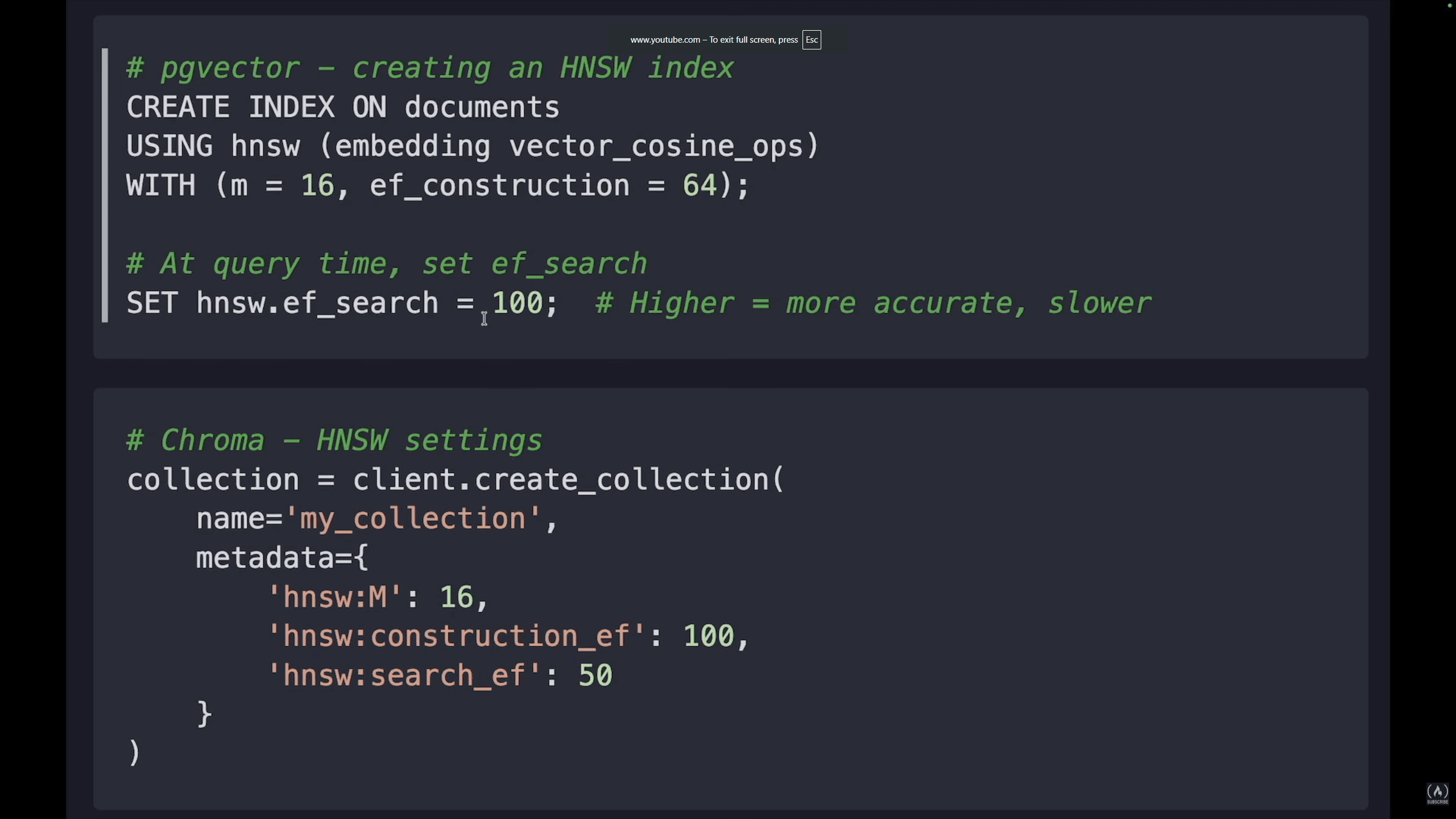
Compare approximate search against exact search and record the recall/latency trade-off. Good nearest-neighbor recall does not automatically mean good answer quality.
Also check vector storage limits separately from index limits. A database may store a vector size that a particular index or data type cannot index.
Reference: pgvector HNSW documentation.
Cost Optimization Strategies
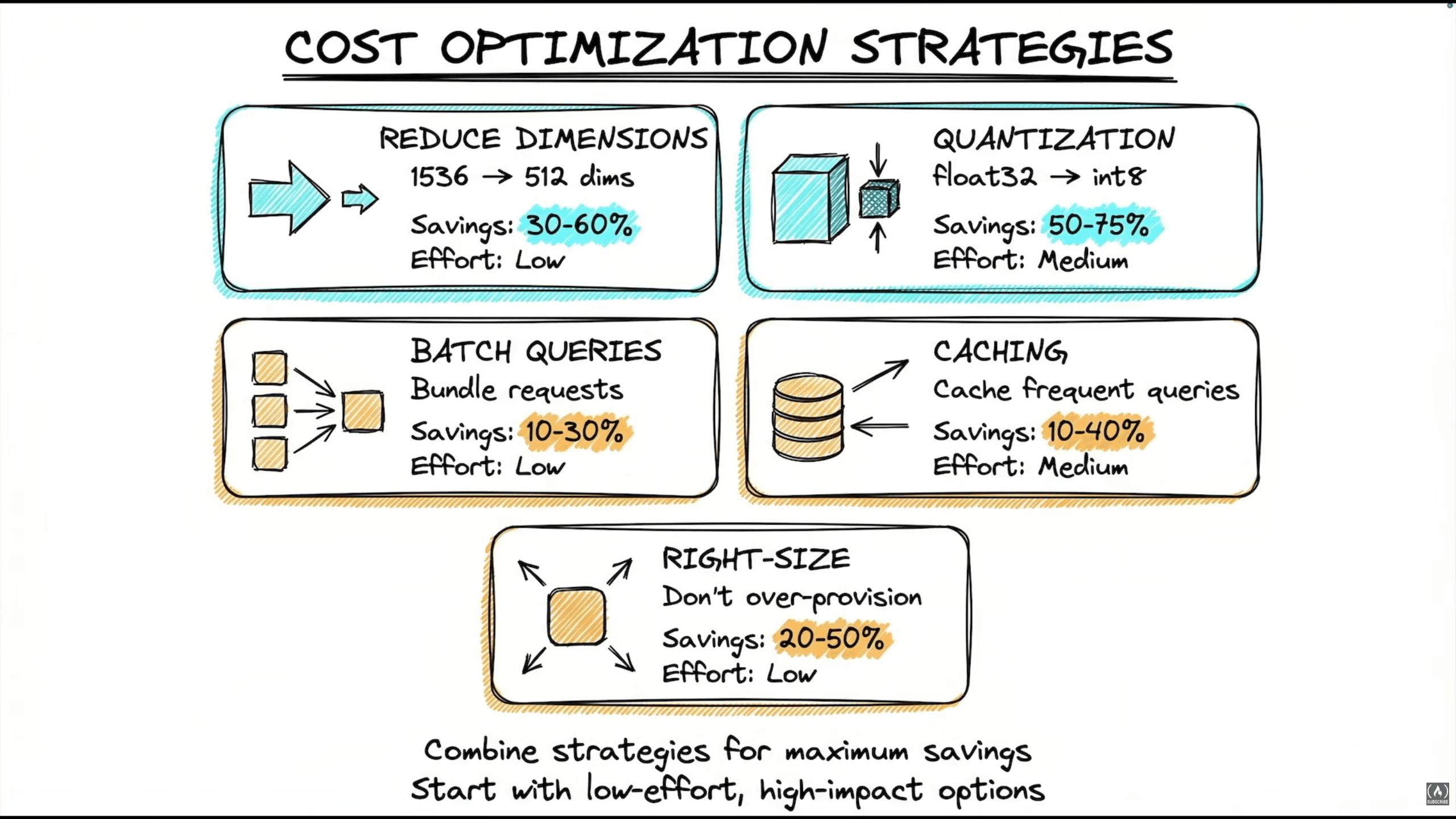
| Strategy | Potential Saving | What to Validate |
|---|---|---|
| Reduce embedding dimensions | Smaller vector storage and similarity work | Model support and retrieval quality |
| Quantization | Smaller vector representation | Index support and quality loss |
| Batching | Better throughput or provider-specific discounts | Latency, rate limits, and pricing rules |
| Caching repeated work | Avoided computation | Hit rate, freshness, permissions, and correctness |
| Right-sizing infrastructure | Less unused capacity | Peak load and latency targets |
The amount saved depends on the workload. For example, reducing 1536 float32 values to 512 reduces the raw vector payload from 6144 to 2048 bytes. That excludes metadata and index overhead, so it does not imply the same reduction in the total bill.
Only reduce dimensions through a method supported or validated for the embedding model, then reevaluate retrieval. Savings from different strategies are not generally additive.
For semantic caching in production:
- Identify the caller's access scope and the context relevant to the answer.
- Search eligible cache entries for an equivalent query.
- Check freshness, permissions, source versions, and other relevant configuration before reusing a result.
A high similarity score alone is not enough. Two questions can be almost identical but ask about different dates, amounts, people, or versions. Conversation history can also change the answer.
Calibrate any similarity threshold on correct and incorrect reuse examples. A value such as 0.95 is not universally safe. Invalidate entries when their source content or permissions change.
Reference: OWASP RAG caching guidance.
Production Visibility
Three layers that work together:
- Layer 1: Structured Logging → what happened.
- Layer 2: Metrics Collection → how much happened and how long it took.
- Layer 3: Instrumented LLM → connects model calls with their logs, traces, and usage.
Observe the full pipeline, from ingestion and retrieval to generation, caching, and error handling. This helps separate a slow search from a slow model call, or a retrieval failure from an answer-generation failure.
Production Project Structure
This is one way to organize a RAG API. The course reference is here: lang-production-api.
The structure helps separate responsibilities. Production readiness still depends on testing, access controls, source updates, and the operating requirements of the application.
lang-production-api/
├── app/
│   ├── config.py       # settings, env loading, lru_cache
│   ├── models.py       # Pydantic request/response models
│   ├── security.py     # validation and security controls
│   ├── cache.py        # scoped cache and invalidation
│   ├── monitoring.py   # structured logger, metrics collector
│   └── agent.py        # LangGraph workflow
├── tests/
│   ├── test_security.py
│   └── test_cache.py
├── main.py             # FastAPI app, lifespan, endpoints
├── Dockerfile
├── .dockerignore
├── docker-compose.yml
├── pyproject.toml
├── uv.lock
└── .env.example
1. Config (config.py)
- Load the settings required by the enabled components, including provider keys and tracing configuration.
- Use
pydantic_settingsto validate them. - Use
@lru_cacheif settings should be loaded once per process. - Include an environment setting such as
APP_ENV.
A local-only setup should not require unused cloud keys. Cached settings are process-local, so decide how configuration changes reach running workers.
2. Models (models.py)
Use Pydantic models for input validation and response structure. For example:
from pydantic import BaseModel, Field

class ChatRequest(BaseModel):
    message: str = Field(min_length=1, max_length=1000)
    thread_id: str | None = None

class ChatResponse(BaseModel):
    answer: str
    source_ids: list[str] = Field(default_factory=list)

class HealthResponse(BaseModel):
    status: str
The message-length limit is an application choice. It does not replace token counting for the full model request. Also verify that a caller is allowed to access a supplied thread_id.
3. Security (security.py)
- Input validation: check schemas, lengths, and supported input types. Suspicious-pattern detection may help flag requests, but removing characters does not reliably prevent prompt injection.
- Authorization: restrict which sources, conversation history, and cached results the caller can access. Enforce this in application code.
- Retrieved content handling: treat documents as untrusted data. Keep source text distinct from instructions and limit what tools the model can use.
- PII handling: apply detection or masking where appropriate, while recognizing that detectors can miss cases.
- Output validation: check structure, source references, and application-specific constraints before returning a response.
These can be connected through a SecurityPipeline, but the class name does not provide protection by itself. Test indirect instructions inside documents, unauthorized source access, and tool permissions.
Reference: OWASP prompt-injection prevention guidance.
4. Cache (cache.py)
Redis is one option for sharing cached results across workers and managing TTLs. Persistence across restarts depends on configuration.
Keep entries scoped to the relevant user or tenant, source versions, and model/prompt configuration. TTL alone does not establish freshness. Monitor incorrect reuse and stale hits alongside cache performance.
5. Monitoring (monitoring.py)
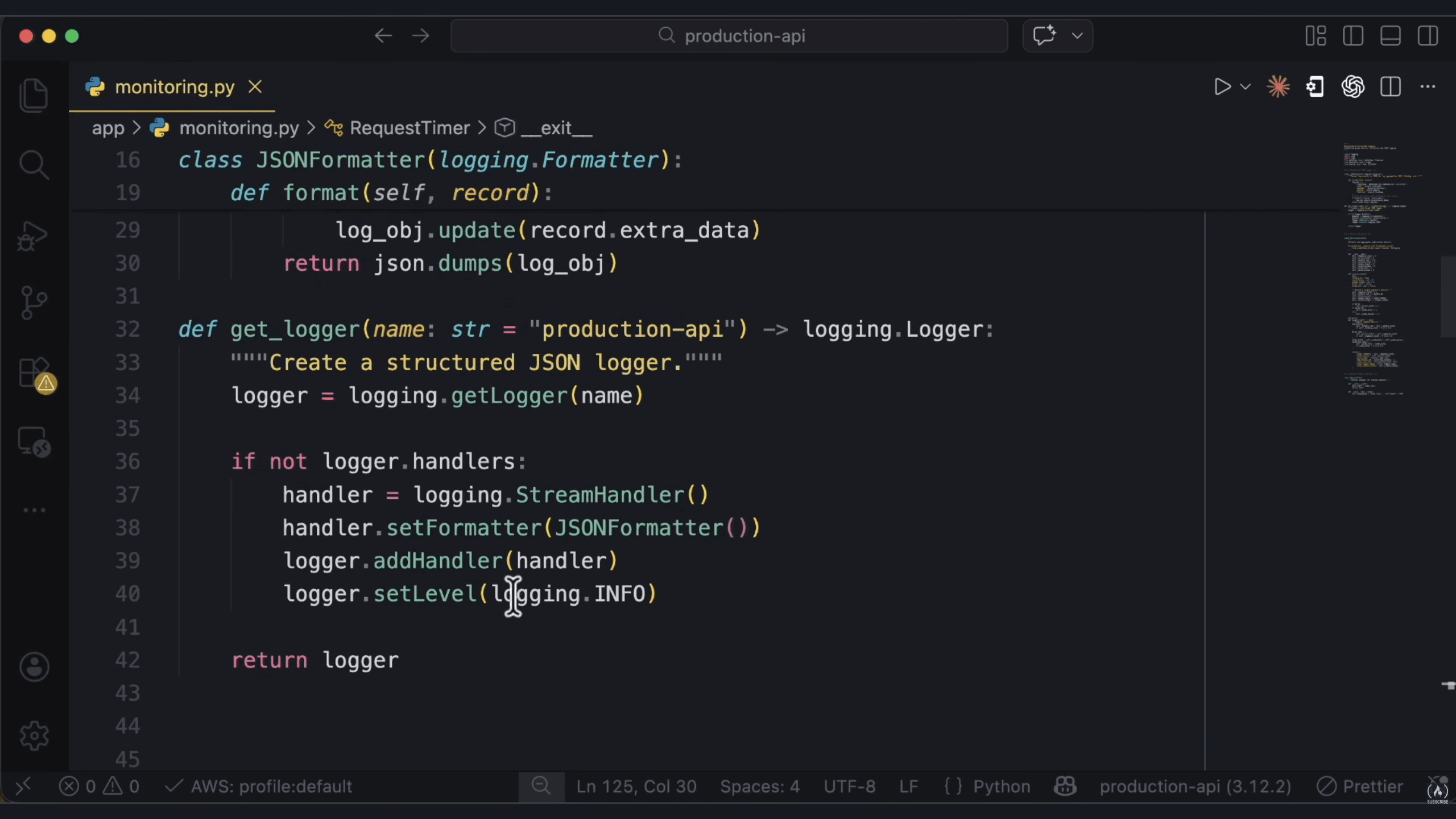
- Format log records as JSON and include useful request metadata.
- Configure
get_logger()and its handlers consistently. Checkinglogger.handlerscan avoid adding the same local handler twice, but propagation to ancestor handlers can still duplicate records. - Use a
MetricsCollectorfor latency, token usage, errors, cache hits, and request counts. Export to a monitoring system such as Prometheus when needed.
Keep sensitive content out of logs unless recording it is explicitly part of the approved data-handling design.
Reference: Python logging documentation.
6. Agent (agent.py)
AgentState: stores workflow state. For message accumulation, useAnnotatedwith theadd_messagesreducer. Other fields can includeerror,retry_count, andmodel_used.ProductionAgent: wraps the chosen LangGraph workflow, bounded retries, fallback behavior, and tracing.- Try the primary model and use a fallback for the failure cases where it makes sense. Validate that the fallback supports the required output or tool schema.
- Inside
_build_graph, add nodes, edges, and conditional routing, then return the compiled graph. - The
invokemethod returns the response, model used, source references, and a suitable error state if needed.
Set retry and timeout limits. Falling back to another model handles some operational failures; it does not by itself fix missing evidence or incorrect answers.
7. Main API (main.py)
Use FastAPI's lifespan pattern to initialize and clean up shared components:
from contextlib import asynccontextmanager
from fastapi import FastAPI

@asynccontextmanager
async def lifespan(app: FastAPI):
    # Initialize shared components here
    try:
        yield
    finally:
        # Clean up initialized resources here
        pass

app = FastAPI(lifespan=lifespan)
This connects the lifespan handler to the app. See the FastAPI lifespan docs.
/chat POST endpoint flow:
- Authenticate the caller, determine access scope, validate input, and check quotas.
- Look up an eligible, fresh cache entry.
- On a cache miss, retrieve authorized evidence, assemble the context, and invoke the answering workflow.
- Validate the result and preserve source references. Apply the relevant checks to cached responses too.
- Store eligible responses with their scope and invalidation metadata.
- Return the response and record appropriately redacted diagnostic events and usage.
Other endpoints:
/health: a process health check./metrics: monitoring metrics./cache/stats: cache performance statistics.
Protect operational endpoints as appropriate. Being alive is different from being ready to answer requests; use a separate readiness check when dependencies or index availability need to be checked.
Also add rate limiting and clear exception handling. Avoid exposing internal errors or credentials in client responses.
8. Tests
test_security.py: deterministic tests for validation, authorization, source isolation, and error handling.test_cache.py: test cache keys, scope, invalidation, and expiration. For cache logic you control, inject a clock instead of relying on real sleeps. Test backend TTL behavior separately.- Retrieval tests: reviewed questions with expected source evidence, including previously successful cases and unanswerable questions.
- Answer evaluations: check support, completeness, and behavior when evidence is missing.
Testing strategy: fast unit tests → integration tests with mocked dependencies → live retrieval and model evaluations in an isolated environment with suitable data and cost controls.
Live evaluations can happen during development as well as staging. Mocked model calls are useful for application behavior, but cannot establish the quality of real answers.
9. Containerizing with Docker
This example uses the root-level main.py from the structure above, exposing a FastAPI object named app. It assumes a compatible uv.lock with all runtime dependencies and an implemented /health endpoint.
FROM python:3.12-slim

# For releases, pin this image and the Python image to tested versions/digests
COPY --from=ghcr.io/astral-sh/uv:latest /uv /usr/local/bin/uv

WORKDIR /app
ENV PYTHONDONTWRITEBYTECODE=1 \
    PYTHONUNBUFFERED=1

RUN useradd --create-home appuser

# Copy source and packaging files; exclude secrets with .dockerignore
COPY . .
RUN uv sync --locked --no-dev --no-editable

# Run the application as a non-root user
USER appuser

EXPOSE 8000

HEALTHCHECK --interval=30s --timeout=5s --start-period=20s --retries=3 \
  CMD ["/app/.venv/bin/python", "-c", "import urllib.request; urllib.request.urlopen('http://127.0.0.1:8000/health', timeout=3).close()"]

CMD ["/app/.venv/bin/uvicorn", "main:app", "--host", "0.0.0.0", "--port", "8000"]
Add a .dockerignore so local environments and secrets are not copied into the image:
.venv/
.git/
.env
.env.*
!.env.example
__pycache__/
*.py[cod]
.pytest_cache/
# docker-compose.yml
services:
agent-api:
build: .
ports:
- "8000:8000"
env_file:
- .env
environment:
APP_ENV: production
LOG_LEVEL: INFO
restart: unless-stoppedThe service inherits the image health check. It uses Python's standard library, so curl does not need to be installed in the image.
docker compose up --buildRun the existing virtual environment directly at startup so the container does not synchronize dependencies each time. If the app writes local indexes or files, provide a writable directory or volume with permissions for appuser.
For faster builds, you can separate dependency installation from source copying with uv's documented layering pattern. The example above keeps those steps together so project files are available during installation.
This is an illustrative container configuration. Test it against the actual project and lockfile before deploying.
References: uv in Docker, uv locking and syncing.
10. Deploying
For code or dependency changes shipped through container images, build and test a new image, then deploy that version. Keep a rollback path and account for database migrations and index compatibility.
Configuration changes may be deployed separately. A Docker health check marks the container's health; restart: unless-stopped does not restart a still-running container just because it becomes unhealthy. Configure recovery behavior in the deployment environment.
Reference: Docker restart policies.
Agentic RAG: Self-Correcting Retrieval
A basic RAG path is:
Query → Retrieve → Generate
An adaptive retrieval path might be:
Query → Retrieve → Evaluate → Retry if needed → Generate or abstain
Fixed workflows can already contain multiple retrieval steps and reranking. What makes this example adaptive is that intermediate results influence what the system does next.
To build this workflow:
- Define
RAGState: aTypedDictwith fields such asquery,rewritten_query,documents,generation,relevance_score,retry_count, andmax_retries. - Create the vector store: embed the documents and retain their source metadata.
retrieve_documents: retrieve using the rewritten query if present, otherwise the original question.grade_documents: estimate whether the evidence is relevant and sufficient. An LLM grader is one option, but check its judgments against reviewed cases.rewrite_query: reformulate the search query while preserving the original intent. Increment the retry state.generate_answer: answer the original question using the selected evidence.fallback_response: return a clear response when the available evidence or retry budget is insufficient.should_retry_or_generate: route to"rewrite","generate", or"fallback"based on the evidence assessment and remaining budget.- Build the graph:
from langgraph.graph import StateGraph, END

# RAGState and the node/routing functions are defined above
workflow = StateGraph(RAGState)

workflow.add_node("retrieve", retrieve_documents)
workflow.add_node("grade", grade_documents)
workflow.add_node("rewrite", rewrite_query)
workflow.add_node("generate", generate_answer)
workflow.add_node("fallback", fallback_response)

workflow.set_entry_point("retrieve")
workflow.add_edge("retrieve", "grade")

workflow.add_conditional_edges(
    "grade",
    should_retry_or_generate,
    {"rewrite": "rewrite", "generate": "generate", "fallback": "fallback"},
)

workflow.add_edge("rewrite", "retrieve")
workflow.add_edge("generate", END)
workflow.add_edge("fallback", END)

rag_app = workflow.compile()
The graph assumes the node functions are implemented. Enforce retry, time, token, and call limits, and test that every path terminates. A grader's score is not proof that the evidence is correct or complete.
When to consider Agentic RAG:
- Measured failures suggest that query reformulation or decomposition could help.
- Different questions need different retrieval strategies.
- The quality improvement justifies extra latency, cost, and operational complexity.
Compare it with the simpler baseline. An application being user-facing or high-stakes does not automatically make an agentic loop the right choice. Stronger validation is needed regardless of the architecture.
Code reference: 04_agentic_rag.py.
Advanced RAG Topics
Do We Still Need RAG?
Some models support large context windows. So why retrieve chunks if we can put more documents into the prompt?
The context limit depends on the model version and serving configuration. The advertised maximum does not guarantee that the model will reliably use every piece of information inside it. Task difficulty, evidence placement, and distracting content also matter.
Direct long-context prompting can be practical for a small, bounded collection that fits within the model's limits and cost budget.
RAG can help when:
- The source collection is too large to include in each request.
- Documents change frequently.
- Requests need different subsets of the knowledge base.
- Access rules need to restrict which sources are available to each caller.
Both approaches still need source attribution and answer evaluation. There is no universal percentage of context usage after which all models become unreliable.
You can also combine both: retrieve candidate documents or sections, then expand the context when the task benefits from it. For example: "Find the section about X, then analyze it with the surrounding document."
Think of RAG and long context as tools. Compare them on your questions, quality requirements, latency, and cost.
Contextual Retrieval
The idea is to add a short description that situates a chunk within its document before indexing it:
- Give the LLM the document and the specific chunk.
- Ask for a brief contextual description.
- Prepend it before embedding and, where used, BM25 indexing.
- Retain the original passage and check the generated description for mistakes.
Existing headings or metadata may provide enough context without an LLM.
Production Considerations
Cost and latency: extra indexing work depends on document length, chunk count, model, caching, and concurrency. Updates may require regeneration.
Storage: prefixes add text. Their relative size depends on chunk and prefix lengths.
When to test it: chunks lose identifying context, such as the company, period, product, or section they describe.
Measured results: Anthropic's 2024 experiment reported relative reductions in top-20 retrieval failure rate of 35% with contextual embeddings, 49% with contextual BM25 added, and 67% with reranking also added. The last result changed the measured failure rate from 5.7% to 1.9%.
These results describe that experiment, not a guaranteed improvement for another dataset.
Reference: Anthropic's Contextual Retrieval experiment.
Code reference: 02_contextual_retrieval.py.
Late Chunking
The idea is to let tokens receive surrounding context before pooling them into chunk vectors:
- Pass a document, or a supported window of it, through the embedding model.
- Obtain contextual token representations.
- Pool the representations within each chunk's boundaries.
The result is one vector per chunk, influenced by the surrounding text the model processed. We are not splitting one final document vector into smaller vectors.
This needs suitable token-level outputs and control over pooling. An API that only returns one final vector per input is insufficient. It can work with suitable long-context embedding models without dedicated retraining, but the available context is still limited to the encoded input window.
Late chunking and late interaction are different techniques. Late chunking changes when chunk representations are pooled. Late interaction keeps multiple representations and combines their matches during retrieval scoring.
Compare late chunking with independent chunks and contextual prefixes on the same evaluation set. Similar goals do not imply identical quality.
Reference: Late Chunking paper.
Code reference: 03_late_chunking.py.
Graph RAG
What if a question requires connecting facts from different parts of the knowledge base?
Graph-based RAG uses relationships between entities or other information units to help retrieve and organize evidence. One approach is to extract entities and relationships, build a knowledge graph, and use it alongside the original passages.
A vector-based system can also retrieve multiple passages for multi-step reasoning. The question is whether explicitly modeling relationships improves the tasks we need to solve.
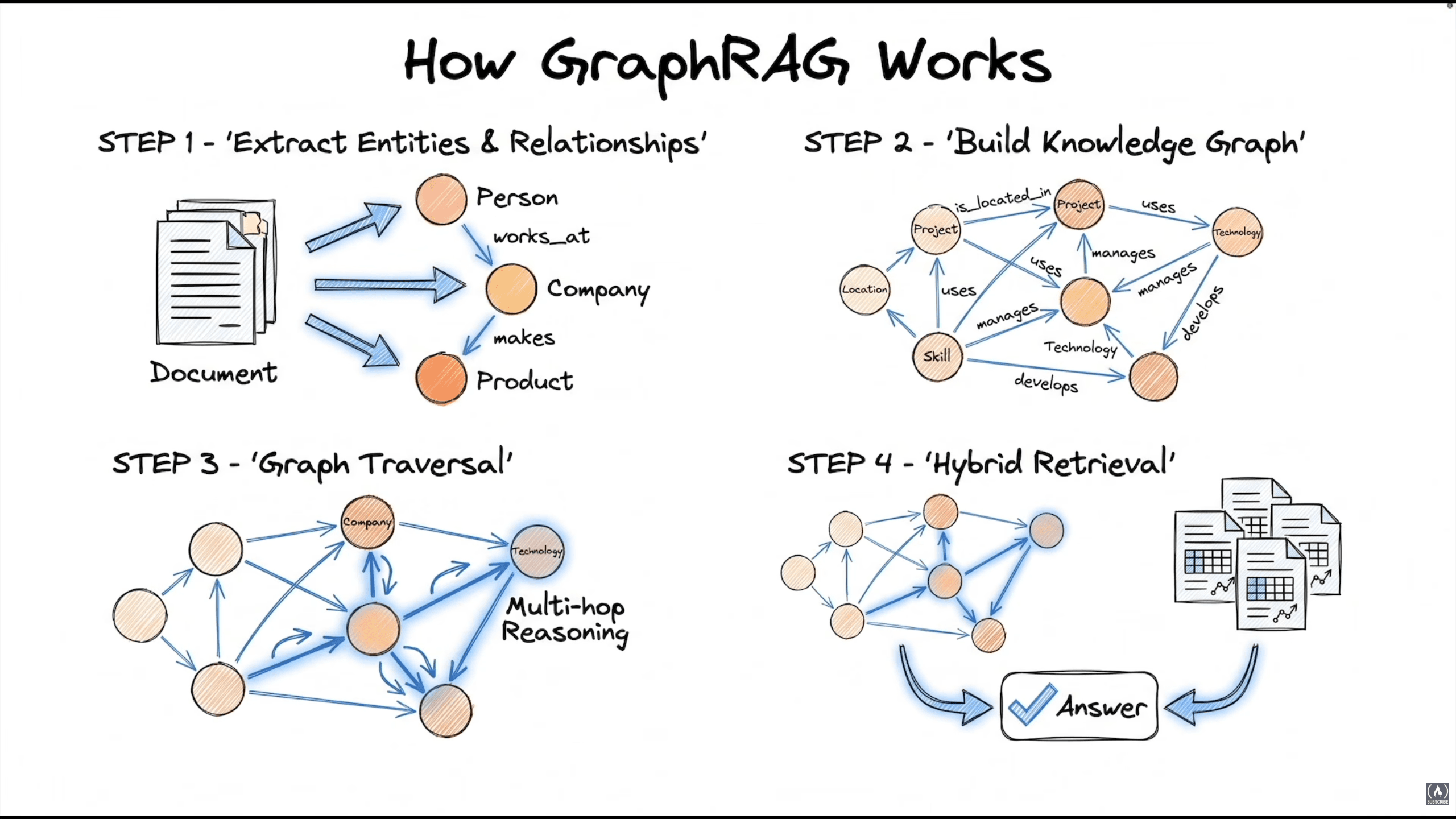
Two useful query modes in Microsoft GraphRAG:
- Local Search: uses entity-related context for questions about particular entities and their connections.
- Global Search: uses community reports to help answer questions across the corpus, such as "What are the main themes?"
Microsoft GraphRAG also supports other query modes. See its query overview for the current implementation.
Implementation options:
- Microsoft GraphRAG: an implementation with its own extraction, indexing, and query workflows.
- LangGraph + a graph database such as Neo4j: a custom workflow with more control over retrieval and orchestration.
- LlamaIndex graph integrations: another option; check the current integration APIs.
- Hybrid Vector + Graph: use vector retrieval and entity relationships together, then provide the original supporting evidence to the answering model.
For a hybrid system, build and maintain the graph and source mappings during ingestion. At query time, identify relevant entities or passages, retrieve related evidence, and generate an answer with source references.
When to consider GraphRAG:
- Questions repeatedly require relationships that a simpler baseline misses.
- The task benefits from entity-focused investigation or corpus-wide summaries.
- You can evaluate extraction quality, entity resolution, and maintenance cost.
When a simpler approach may be enough:
- Most questions are straightforward lookups.
- Graph construction and updates add more cost than useful quality improvement.
- The source changes faster than the graph can be maintained reliably.
There is no universal minimum document count. A small collection can contain complex relationships, and a large one may still need only simple retrieval.
Code reference: 05_graphrag_intro.py.
Multimodal RAG
The problem: text-only extraction can lose visual evidence. Charts, diagrams, complex tables, and layout may contain information that plain extracted text does not preserve.
The amount lost depends on the document and parser. Inspect the output before deciding whether to use structured extraction, OCR, image-based retrieval, or a combination.
One approach: PDF → page images → image-based retrieval → vision-capable answering model.
The retrieved images give the model access to visual evidence, but its reading and reasoning still need evaluation.
ColPali Key Insight
ColPali uses a vision-language model to create multi-vector representations of document pages and a late-interaction mechanism to score matches with a query.
- Based on PaliGemma.
- Produces multiple vectors per document page, not one vector per page.
- Compares query-token and page representations during retrieval scoring.
- Its image-based retrieval path does not require a separate text-extraction stage.
A generic vision model is not automatically a trained retrieval model. ColPali's representations and scoring need compatible storage and retrieval support; one cosine comparison per page does not implement its late interaction.
The selected page images can then be sent to a vision-capable LLM for answering.
Reference: ColPali paper.
Full Pipeline
- Convert PDF pages into images, preserving document and page IDs.
- Generate page representations. For ColPali, store the multiple vectors associated with each page.
- Retrieve relevant pages using the model's compatible scoring procedure.
- Send the selected images and question to a vision-capable LLM.
- Return an answer with page references and evaluate whether the visual evidence supports it.
- Use text or structured retrieval where those representations already preserve the needed information.
Update the stored representations when source pages change.
When to Use Multimodal RAG
Worth testing for: documents where the answer depends on charts, diagrams, layout, or tables that extraction handles poorly. This can happen in financial reports, technical manuals, research papers, and other document types.
A simpler approach may be enough for: plain text or structured data whose evidence is preserved by extraction or direct querying.
Choose based on the evidence and questions, not just the document's industry label. Compare quality, latency, throughput, and cost before deciding on text, image, or hybrid retrieval.
Code reference: 06_multimodal_rag.py.
Spot an inaccuracy, or need further clarification on this topic? Feel free to reach out at midaghdour@gmail.com.